Admins can choose your system-wide preferences for managing your matter types.
NOTE: For help creating or editing matter types, see Creating and Editing a Matter Type (Admin).
To do this:
- In Actionstep Practice Management, go to Admin > General settings. The General Settings page appears.
- Locate the Matter types section and make any of the following changes:
- Toggle Inline Matter type creation to on to allow users to create new matter types when creating new matters.
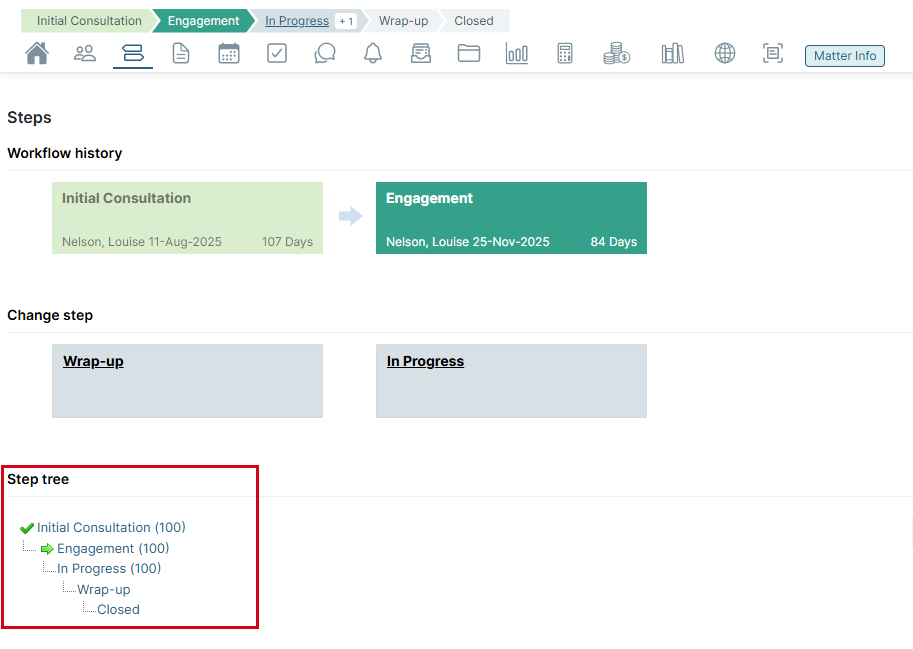
- Toggle Show step tree to on to include the Step tree on the Steps page of a specific matter.TIP: This is the Step Tree that will be displayed on a matter's Steps page if this option is enabled.
- Click Save to save your changes.
Additional Resources:
- Setting Actionstep System Preferences (Admin)
- Setting Business Details in System Preferences (Admin)
- Setting Your Business Logo in System Preferences (Admin)
- Setting Up Abbreviations in System Preferences (Admin)
- Setting Up Timekeeping in System Preferences (Admin)
- Setting Up Quick Codes in System Preferences (Admin)
- Setting Regional Data Formats in System Preferences (Admin)
- Setting Contact Type Mappings in System Preferences (Admin)
- Setting Up Aliases and Terminology in System Preferences (Admin)
- Setting Additional Settings in System Preferences (Admin)
Setting Early Access and Feature Preview Options in System Preferences (Admin)
Was this article helpful?
That’s Great!
Thank you for your feedback
Sorry! We couldn't be helpful
Thank you for your feedback
Feedback sent
We appreciate your effort and will try to fix the article