As you process a trust reconciliation in Actionstep, you can make adjustments to that trust reconciliation. These allow you to finalize your reconciliation accurately. These adjustments will also affect how your next trust reconciliation will be handled. This article explains why adjustments are made to trust reconciliations and why they affect the opening balance of your next reconciliation.
To learn about trust reconciliations generally, see Reconciling a Trust Account.
Why Are Adjustments Made to a Trust Reconciliation?
• Before you create an adjustment to a trust reconciliation, make sure that the transaction is entered into Actionstep. If not, enter it then refresh your trust reconciliation. If the transaction is still not included, consider creating an adjustment for it.
• Adjustments can be carried over and subsequently need to be removed from the next month's reconciliation.
How Adjustments Affect Your Next Trust Reconciliation
When you start your next trust reconciliation, any transactions you made adjustments for last time will show up again as unreconciled. For example, if you had five adjustments last month, those same five will appear in this month’s reconciliation.
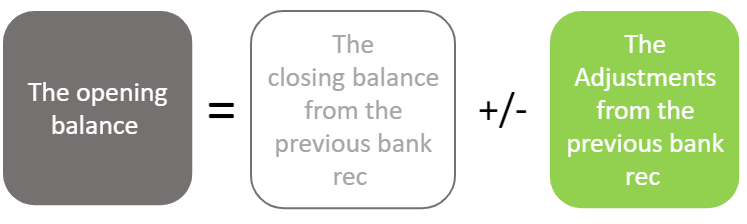
Simple Example Scenario
Let’s say a firm starts trading on January 1 with no previous transactions, and for the purposes of this simplified example, only deposits are made.
January:
- The firm makes 10 deposits of $1,000.
- The last one was entered on February 1 but dated January 30.
- While reconciling January, the firm notices they’re $1,000 short.
- They confirm the deposit is in Actionstep, so they add a $1,000 adjustment.
- January is now reconciled, showing a closing balance of $10,000.
February:
- February has 10 more deposits of $1,000, and they are all entered correctly.
- The opening balance used is $10,000 (from January).
- But the bank balance is actually $20,000.
- Now there are 11 transactions: 10 from February and the one January deposit that wasn’t in the January bank statement.
- After reconciling, the system shows $21,000, which is $1,000 too much.
- This happens because the opening balance wasn't adjusted for that $1,000 January adjustment. Remember, adjustments carry over and subsequently need to be removed from the next month's reconciliation.
The Fix:
- The correct opening balance for February should be $9,000 (January’s $10,000 minus the $1,000 adjustment).
- Now with 11 deposits of $1,000, the total reconciled amount becomes $20,000 — matching the bank.
- Reconciliation is successful.
Was this article helpful?
That’s Great!
Thank you for your feedback
Sorry! We couldn't be helpful
Thank you for your feedback
Feedback sent
We appreciate your effort and will try to fix the article