You can enter time as a fixed fee without changing the matter's billing arrangement.
To do this:
- In Actionstep Practice Management, click the global Create button and choose Time Entry. The Create Time Entry window appears.
- Complete the information required information, as described in Creating a Time Entry.
- For the Rate drop-down list, choose Fixed Fee.
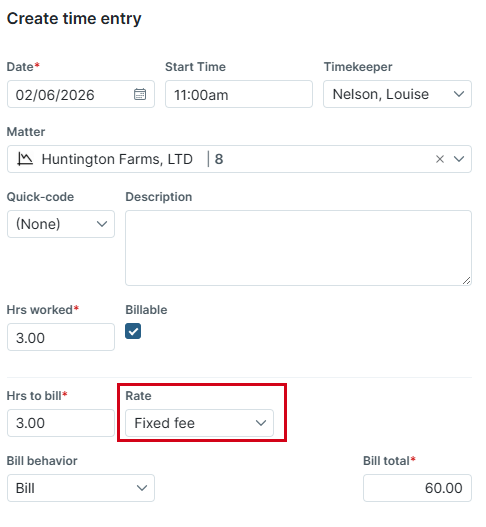
You can then enter the details required to create a fixed-fee invoice.
To learn more about setting up fixed fees and creating a rate label for a fixed fee, see Configuring Your Billing Settings (Admin) and Creating a Rate Label.
Additional Resources:
- Setting Up a Fixed Fee Billing Arrangement for a Matter
- Setting a Fixed Fee Billing Schedule for a Matter
- Generating an Invoice Using Fixed Fee Billing
- Creating a Rate Label (Admin)
- Configuring Your Billing Settings (Admin)
Was this article helpful?
That’s Great!
Thank you for your feedback
Sorry! We couldn't be helpful
Thank you for your feedback
Feedback sent
We appreciate your effort and will try to fix the article