Since many fee earners might need to review a bill before it is sent to the client, a bill may stay in draft status for a week or longer. While this bill is in draft, you may need to add additional unbilled fees or disbursements (or work in progress) to it. You can do this from the matter’s Billing page.
To add WIP to a draft bill:
- In Practice Management, view the matter with the unbilled time entries you want to add to an existing draft invoice. (See Editing a Matter for help.)
- Click the Billing menu icon. The Billing page appears.
- From the menu on the left, click either Fees or Disbursements/Expenses. A list of fees or disbursements/expenses is displayed.TIP: You can use the Filter > Bill Status option to update the list to show only unbilled transactions..
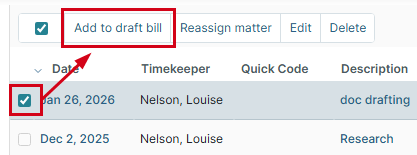
- Select the checkbox for the unbilled fee or expense/disbursement you want to invoice and choose Add to draft bill.
 The Add WIP to Draft Invoice window appears.
 - Review the information in the table and confirm which items you want to add to the draft bill. (This helps ensure nothing is added by mistake.)NOTE: If there is a fee adjustment on the draft invoice, adding fees will not affect this. However, if there is a manual adjustment to the fee allocation on the draft invoice, adding fees will remove this, reapplying the fee allocation rules set on the matter.
- If you have multiple draft invoices, click the Select invoice to add WIP to drop-down list and choose the invoice. Otherwise, the draft invoice that will be used is displayed at the bottom of the window.
- Click Confirm. The fees or disbursements are added to the draft invoice.
Additional Resources:
Was this article helpful?
That’s Great!
Thank you for your feedback
Sorry! We couldn't be helpful
Thank you for your feedback
Feedback sent
We appreciate your effort and will try to fix the article