Funds held in a general retainer can be transferred between matters to pay other bills for matters for the same client.
NOTE: Make sure the matter you are transferring the funds to has its general retainer enabled. If not, complete the instructions in Setting Up General Retainers.
Before you begin:
- General retainers must be enabled in your system. See Setting Up General Retainers to learn more.
To do this:
- In Actionstep, click the global Create button and choose Transfer from the Retainers section. The Transfer Retainer window appears.
- Click the From matter drop-down list and choose the original matter.
- Enter the Transfer amount.
- In the Transfer to table, select the matter to which you’d like to transfer the funds. To distribute funds between multiple matters, click +Add row and select additional matters.
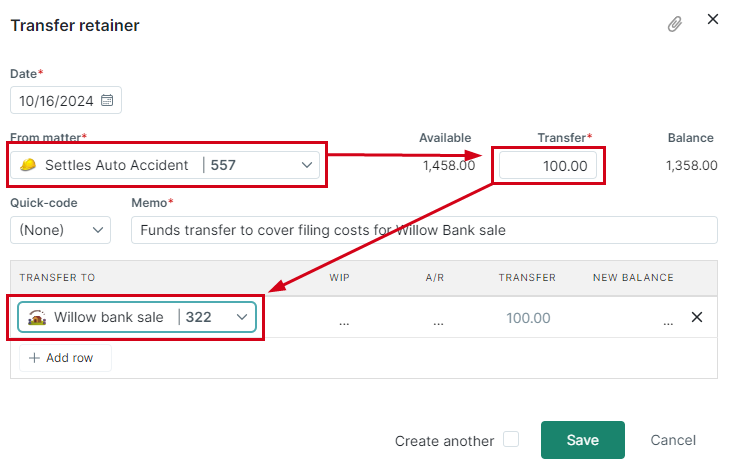
- Click Save to apply the transfer.
Additional Resources:
- Setting Up General Retainers
- Receiving Funds in a General Retainer
- Paying Bills Using General Retainer Funds
- Refunding a General Retainer
- Replenishing a General Retainer
Was this article helpful?
That’s Great!
Thank you for your feedback
Sorry! We couldn't be helpful
Thank you for your feedback
Feedback sent
We appreciate your effort and will try to fix the article